IBM Watson Health · Case study · Mobile

Digital Health Pass

A secure, privacy-first way to prove your COVID-19 test or vaccination status at stadiums, airports, and workplaces, without handing over your whole medical record.

My roleUX lead for the wallet app: wireframes, flows, UI
TeamProduct, blockchain, security, and engineering
PlatformiOS + Android wallet, venue verifier app
FocusPrivacy, trust, and speed at the door
00Overview

Proof you can trust, in a single scan.

During COVID-19, people had to show their health status just to get into a game, board a flight, or go back to the office. Most of them were doing it with a paper card or a screenshot, which was easy to lose, easy to fake, and gave away more personal info than anyone needed.

I led the design of the IBM Digital Health Pass wallet app. It stores a verifiable credential on your phone, backed by encryption and blockchain, and lets you share only what a venue actually needs through a QR code.

40%faster verification at the door
30%fewer entry delays at major venues
50%of users said it felt more secure than paper
01The challenge

Paper cards didn't scale, and they didn't protect anyone.

People and venues both had a trust problem. Users worried about who was seeing their health data. Venues needed to check thousands of people quickly without becoming a data breach waiting to happen.

01 / Privacy

Too much exposed

A paper card or screenshot shows everything on it to whoever's at the door. People had no control over what they shared.

02 / Fraud

Easy to fake

Paper and photos could be copied or edited, so staff couldn't fully trust what they were looking at.

03 / Speed

Slow lines

Manual checks created bottlenecks at entry, especially at stadiums and airports with huge volumes.

Objective

Give people a digital pass they trust, and give venues a fast, reliable check that never stores more than it needs.

How might we

How might we let someone prove they're cleared to enter in seconds, while sharing as little about themselves as possible?

02Discovery

Trust came up in every interview.

I talked with users about how they handled their paper records today, and with venue operators about what slowed them down at the door. Then I worked side by side with the blockchain and security teams so the design and the encryption told the same story.

45%of users were worried about the security of their physical test results or vaccination cards.
Users wanted control

People were fine proving they were cleared. They didn't want to hand over their date of birth, medical details, or anything else that wasn't needed.

Venues wanted speed

Operators needed real-time verification that worked in seconds and plugged into the security setup they already had.

Security had to be visible

Encryption only builds trust if people can feel it. The UI needed to show what's protected and what's shared, in plain language.

01
Receive

A pharmacy or lab issues a verifiable credential to the wallet

02
Store

It's encrypted on the phone and anchored on the blockchain

03
Share

The user picks what a venue can see before showing the code

04
Verify

Staff scan and get a clear yes or no, with nothing stored

03The design

Less to read. More to trust.

The original wireframes proved the concept: a credential, a QR code, and a list of connections. For the final design I focused on the moment that matters most, standing at the front of a line with your phone out, and made every screen answer one question: am I good to go?

03.1 — Wallet home

Your status, at a glance.

The early version opened on an organization's contact page, with the pass buried below it. Now the pass is the home screen. A clear verified badge, the expiry date, and one big "Show at entry" button. Trusted issuers and recent venues sit underneath.
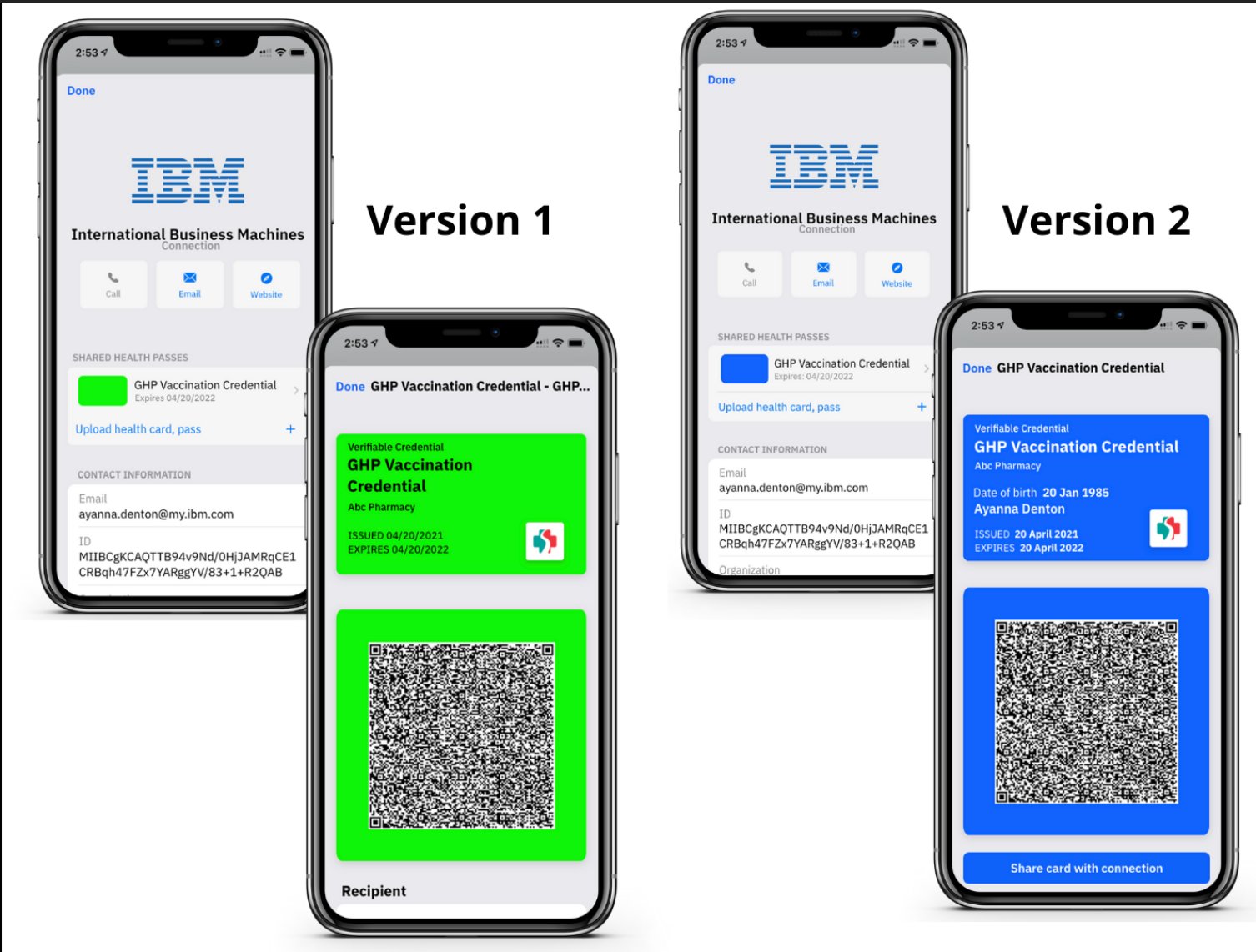
Early wireframes of the Digital Health Pass wallet, versions 1 and 2
ChangePass first

The thing people open the app for is now the first thing they see.

ChangeStatus in words

"Verified" and "Valid until" replace raw IDs and keys, which users read as errors.

ChangeOne clear action

A single primary button gets people to their code in one tap.

03.2 — Choose what to share

Share the answer, not the record.

Before showing a code, the venue's request appears in a bottom sheet. People see exactly what's being asked for and why, can turn off anything that isn't required, and know the access ends when the event does.

PrivacyMinimum by default

Only "cleared to enter" and your name are on. Date of birth stays off unless the venue truly requires it.

TrustVerified requester

The venue's identity is confirmed, so people know who's asking before they share.

ControlAccess that expires

Sharing ends automatically after the event, and people can revoke it anytime.

03.3 — Show code + verify

A yes or no in about a second.

The entry code goes full-screen in dark mode with max brightness, so it scans fast in any lighting. It refreshes every 30 seconds, which makes screenshots useless. On the venue side, staff get a big green check and nothing else to read.

SecurityRotating code

A live, refreshing QR code shuts down the copy-and-paste fraud that paper allowed.

SpeedBuilt for the line

Large code, high contrast, no extra taps. The scan works from arm's length.

VenueNothing stored

The verifier confirms the credential on the blockchain and keeps no health data.

04Impact + reflection

Faster lines, and people who felt safe using it.

Results

What changed

40%

Faster verification, cutting wait times at entry.

30%

Fewer entry-related delays at major venues.

50%

Of users found it more secure and streamlined than paper.

Multi

Scaled across healthcare, entertainment, and travel.

Takeaways

  • 01
    Security has to be feltStrong encryption wasn't enough on its own. Plain-language status and clear sharing controls are what made people trust it.
  • 02
    Design for the worst momentA crowded line, bad lighting, low battery. Designing for that made every other moment easier too.

If I took it further

  • →
    Offline modeLet passes verify without signal, for airports and packed stadiums.
  • →
    Accessibility firstScreen reader flows and an audio confirmation at the scanner for low-vision users.